

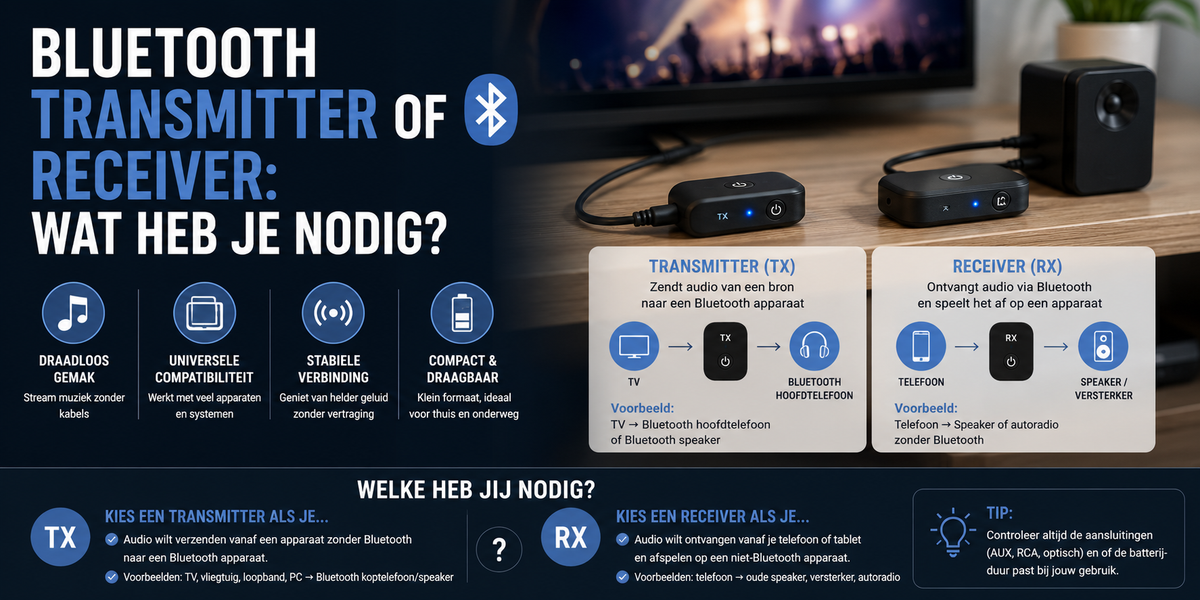
Bluetooth adapters are often ordered incorrectly, and this is due to two words that look similar: transmitter (TX) and receiver (RX). They do the exact opposite of each other. Fortunately, the choice can be made in one question — and that question is below. After that, we will go through the most common situations: TV, car radio, stereo system, and that one device with only a headphone jack.
The question that decides everything
Ask yourself one thing: is the device without Bluetooth on the sound-producing side, or on the listening side?
- ✔ The sound comes out of it (TV, laptop, keyboard, old MP3 player) and you want to send it wirelessly to your earbuds or speaker → you need a transmitter (TX). It transmits.
- ✔ The device makes sound audible (car radio, stereo system, speaker set, amplifier) and you want to send music to it wirelessly from your phone → you need a receiver (RX). It receives.
In short: the adapter takes over what the old device cannot do. Can your TV not transmit? Transmitter. Can your stereo not receive? Receiver. A 2-in-1 adapter with a TX/RX switch covers both — and is therefore often the safest choice if you are still doubting or might want to use it for something else later.
The four most common situations
1. TV with wireless headphones (transmitter)
The classic: watching TV in the evening without keeping the rest of the house awake. The transmitter plugs into the headphone jack or audio output of the TV and sends the sound to your earbuds or headphones. Pay attention to latency here: for picture and sound that need to be synchronized, an adapter with low latency is important — otherwise you will see lips moving and hear the voice a fraction of a second later.
2. Car radio without Bluetooth (receiver)
A car with an AUX input but no Bluetooth can still go wireless with a receiver: plug the adapter into the AUX port, power it via USB or 12V, pair your phone, and drive. This is by far the cheapest way to equip an older car with streaming and hands-free calling — for those who prefer to replace the entire radio, the complete units can be found under car radios.
3. Giving an old stereo system new life (receiver)
That amplifier with real speakers from back in the day often still sounds better than a modern compact speaker. A receiver on the AUX or RCA input makes it streaming-ready: Spotify from your phone, sound via the speakers the system was built for. No new set needed, no cables through the room.
4. Projector, keyboard, or PC without Bluetooth (transmitter)
Any device with a headphone output can become wireless. A projector with mediocre built-in speakers can be connected to a real soundbar or speaker set without a cable running through the living room; the same applies to a digital piano on which you want to practice quietly in the evening.
What else to look out for
- ✔ Connection — 3.5 mm jack is the most common; some devices have RCA (red/white) or optical. Check the back of your device before you order
- ✔ Bluetooth version — newer means a more stable connection and more efficient power consumption
- ✔ Low latency — only important for video (TV, projector, gaming); for music only, it doesn't matter
- ✔ Power supply — some adapters work on a built-in battery, others on USB power; in the car, USB is convenient, while with a TV you might prefer not to charge it every week
- ✔ Two headphones at once — handy for watching TV together; not every adapter can do this, so check if you want that feature
Setting it up in three steps
- Set the switch correctly (for a 2-in-1 model): TX to transmit, RX to receive. This is the mistake that causes most "it doesn't work" moments
- Connect to the right port — for transmitting, use the headphone or audio output; for receiving, use the AUX or line input
- Pair — put the adapter in pairing mode (usually by holding the button down until the light flashes) and find it on your phone or headphones. After that, it connects automatically
Not working right away? Nine times out of ten, it's the switch or the wrong port — not the device.
Frequently asked questions
What is the difference between a Bluetooth transmitter and receiver?
A transmitter (TX) sends sound: you connect it to a device that produces sound but has no Bluetooth, such as a TV. A receiver (RX) receives sound: you connect it to a device that plays sound, such as a car radio or stereo system. A 2-in-1 adapter can do both, using a switch.
Which one do I need for my TV?
A transmitter. The TV produces the sound and cannot send it wirelessly; the adapter takes over via the headphone or audio output. If you are watching TV with video, pay attention to low latency so that sound and image remain synchronized.
Can I make my old car radio wireless?
Yes, if there is an AUX input: a Bluetooth receiver in the AUX port, power via USB or 12V, and your phone streams wirelessly to the system. That is the cheapest way to equip an older car with streaming without replacing the radio.
Why do I hear the sound slightly later than the picture?
That is latency: Bluetooth has a small delay between sending and playing. With music, you won't notice it, but with movies and games, you will. For that, choose an adapter with low latency — then the picture and sound will stay in sync.
Do you know which way to go? View the Bluetooth transmitters and receivers from Strex — including 2-in-1 models that work both ways. More sound products can be found in the audio collection.

